Security issue duplicates and copies
TRON.ASOC uses mechanisms to detect copies and deduplicate security issues. They help find duplicate records and reduce redundant information in the results.
Difference between a copy and a duplicate
A copy is a vulnerability whose hash exactly matches the hash of an existing vulnerability (the hash fields are described in the Hash-based copy detection subsection). Because you can configure the set of fields included in the hash through the configuration file, a hash match doesn't necessarily mean that both vulnerabilities were detected by the same scanning tool. If the Tool_Type_name field isn't included in the hash, a vulnerability found by another tool can also be recognized as a copy.
When the hashes match, the system doesn't create a new record. It doesn't save the copy and only updates the last detected date for the existing vulnerability. For example, if you upload the same report with the same vulnerability 50 times, the system saves the vulnerability during the first upload. During each of the next 49 uploads, it only updates the last detected date without creating additional records.
A duplicate is a vulnerability whose hash differs from the hash of another vulnerability by at least one field, but that the system groups with the other vulnerability according to the Deduplication rules or that a user manually marks as a duplicate. A duplicate isn't associated with a scanning tool. For example, the same tool can find two duplicate vulnerabilities. Duplicates aren't copies.
Hash-based copy detection
The system uses a hash-based mechanism to detect copies of vulnerabilities. The hash is generated from the following vulnerability fields:
Tool_Type_name—scanning tool type;CVE—CVE identifier;CWE—CWE identifier;Source_file—source file path;Lib_name—library name;Lib_version—library version;Category—vulnerability category;Source_object—source object;Line—line number;Matched_Code—matching code fragment.
Because you can configure these fields through the configuration file, you can, for example, exclude Tool_Type_name. The system then recognizes matching vulnerabilities as copies regardless of which tool detected them.
The system detects copies as follows:
- When you start TRON.ASOC with hashing enabled, the system recalculates the hash for all existing vulnerabilities.
- The system detects copies and deletes them, keeping the earliest record from each set of copies.
- The system determines the remaining vulnerability's status according to the following rule:
New—if at least one copy had an open status;Fixed—if none of the copies had an open status.
The system applies the same logic each time you upload a new report. If the hash of a newly detected vulnerability matches the hash of an existing vulnerability, the system only updates the last detected date of the existing vulnerability and doesn't create a new vulnerability record.
You can change hash parameters only through the configuration file. You can't manage them through the user interface.
The system displays the number of vulnerabilities in the scan results based on hashing.
Issue deduplication
Deduplication automatically finds and combines duplicate security issue records.
For more information about configuring global Deduplication rules, see Deduplication rules.
Find duplicate security issues
To view duplicate security issues, follow these steps:
- Go to the Issues section.
- Open the security issue that deduplication might apply to.
- Select Find and deduplicate similar issues from the Actions dropdown list.
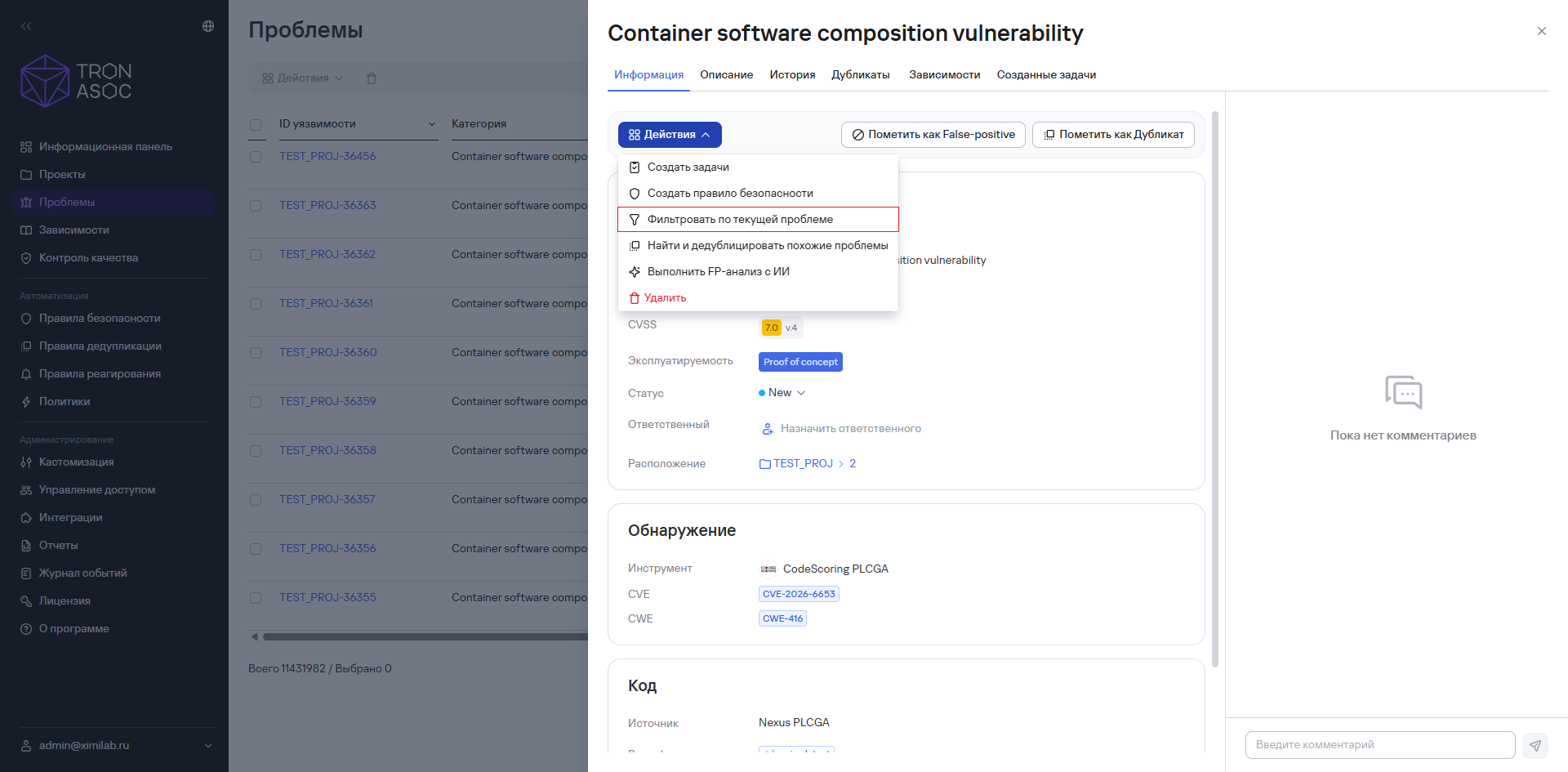
- In the window that opens on the right, set the required filters.
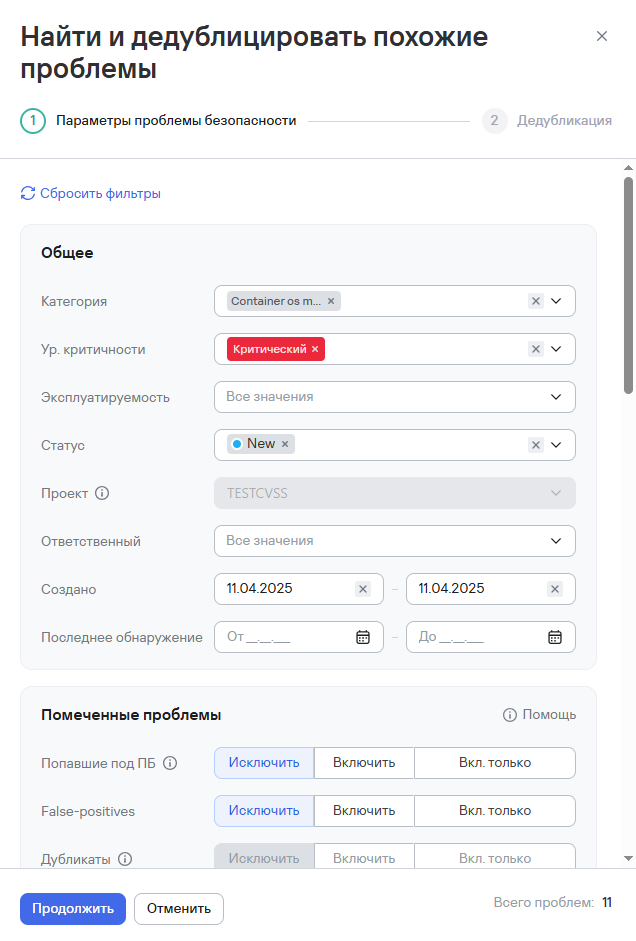
-
Select Continue.
-
Select the vulnerabilities from the list in the new window on the right.
-
Select Mark as duplicate.
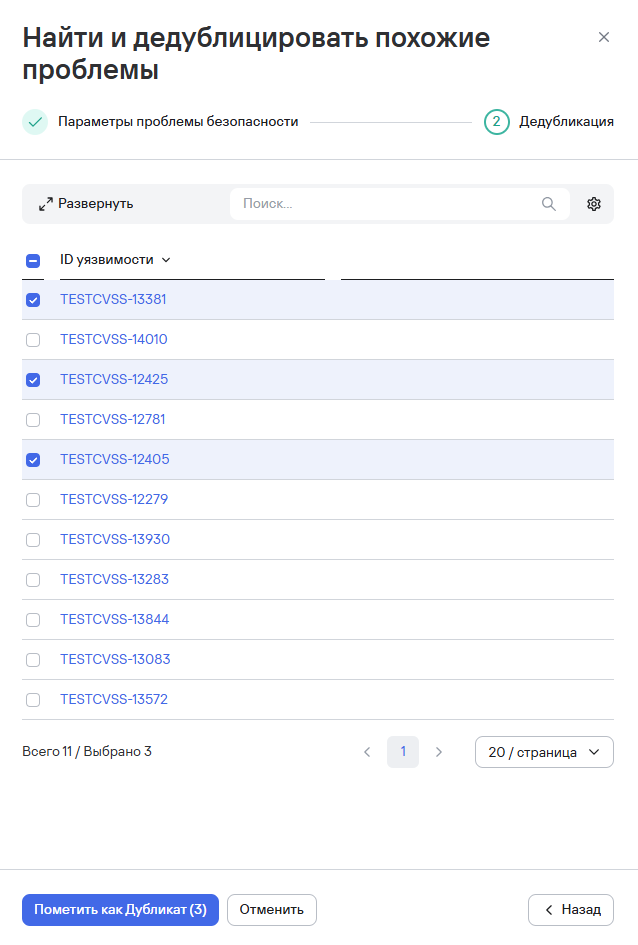
After you complete these steps, the system marks the issues as duplicates and links them to the new issue. A notification about this appears in the system interface.