Information panel
The information panel contains summary graphs (widgets) for vulnerabilities over the selected period. Data updates once a day.
The information panel includes the following widgets (graphs):
- Cumulative graph;
- Open vulnerabilities;
- Most common open vulnerabilities;
- Most common critical and high vulnerabilities;
- Most vulnerable projects;
- Mean Time to Detect (MTTD);
- Metrics;
- Number of vulnerabilities;
- Security Defect Lead Time;
- Fixed Vulnerabilities;
- Number of duplicates;
- Number of false positives;
- Mean Time to Resolve;
- Risk Density;
- Integrated Risk Index;
- Scan Frequency;
- Issues by security tool;
- Issues for the selected tool.
How cumulative graphs work
The following graphs are cumulative, meaning their values increase over time:
- Security Defect Lead Time;
- Mean Time to Detect (MTTD);
- Mean Time to Resolve;
- Most common critical and high vulnerabilities;
- Integrated Risk Index;
- Scan Frequency;
- Fixed Vulnerabilities;
- Risk Density;
- Number of false positives;
- Number of vulnerabilities;
- Number of duplicates.
Cumulative graphs get data from a shared cache that isn't tied to an individual user. To reduce system load when users frequently request updates, the system adds a delay between cache updates. Environment variables set the delay and the parameter that determines whether to update data in real time. The parameter is enabled by default.
Depending on the parameter value, cumulative graphs use one of two update modes:
- when the parameter is enabled, data updates in real time, subject to the configured delay between updates;
- when the parameter is disabled, data updates once a day, at 12:00 AM server time. The system determines the current server time based on the user's time zone and UTC.
Graph update time
Use the APP_CUM_CRON environment variable in the configuration file to configure the update time.
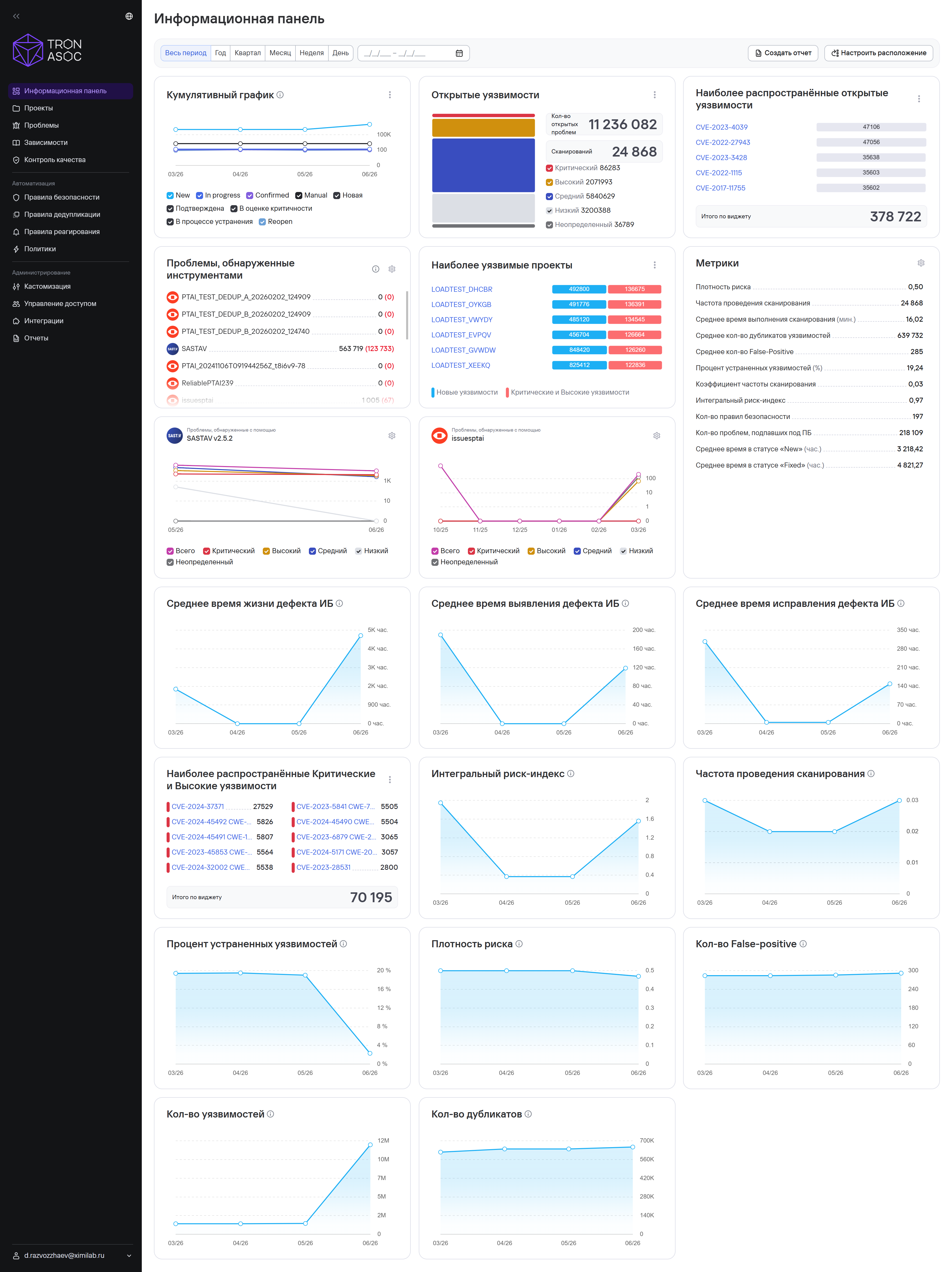
Cumulative graph
This widget shows the vulnerability detection trend for the selected period and lets you analyze changes in the total number of security issues.
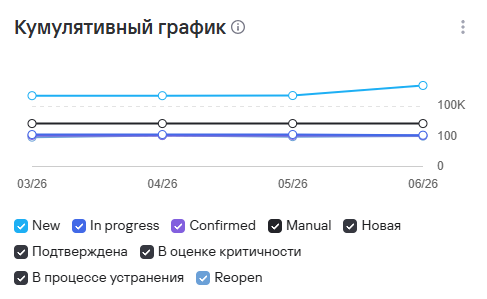
Open vulnerabilities
This widget shows the total number of detected vulnerabilities, grouped by severity and status.
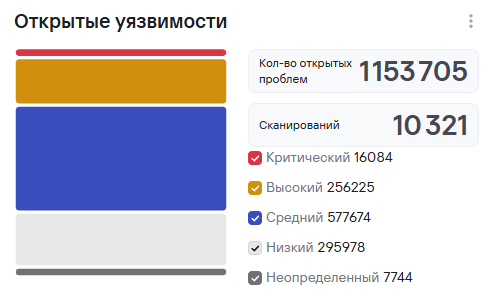
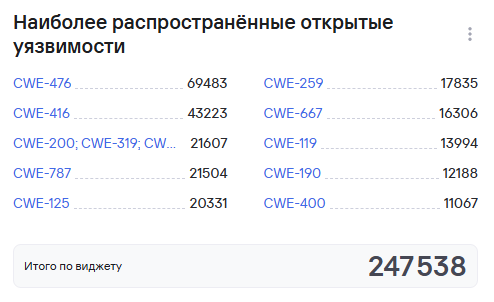
Most common open vulnerabilities
This widget shows the number of unresolved security issues that require processing or remediation.
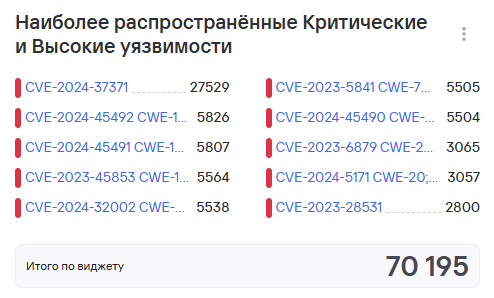
Most common critical and high vulnerabilities
This widget shows a list of the most critical security issues with a high risk level and remediation priority.
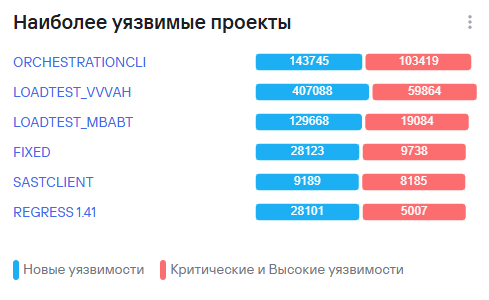
Most vulnerable projects
This widget shows projects with the highest number of detected security issues during the selected period.
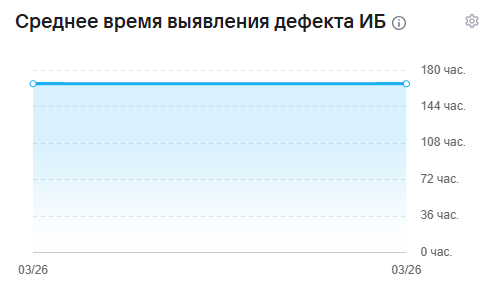
Mean Time to Detect (MTTD)
This widget shows the average time between the appearance of a security issue and its detection by analysis tools.
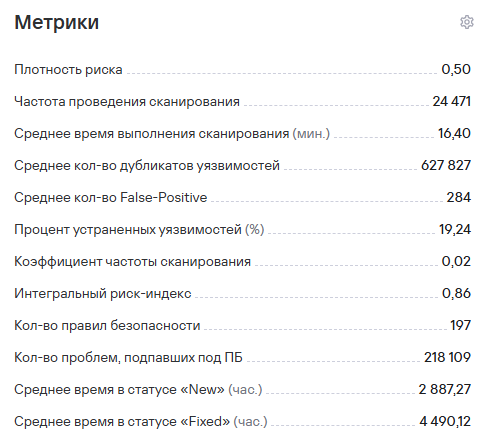
Metrics
This widget shows key performance indicators for secure development and security issue management processes.
Number of vulnerabilities
This widget shows the total number of detected security issues during the selected period.

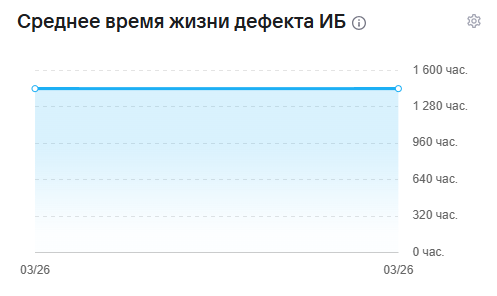
Security Defect Lead Time
This widget shows the median time that a security issue exists, from detection to closure.
Fixed Vulnerabilities
This widget shows the ratio of closed security issues to the total number of detected vulnerabilities.

Number of duplicates
This widget shows the number of security issues that the system identified as duplicates.

Number of false positives
This widget shows the number of false-positive vulnerabilities.

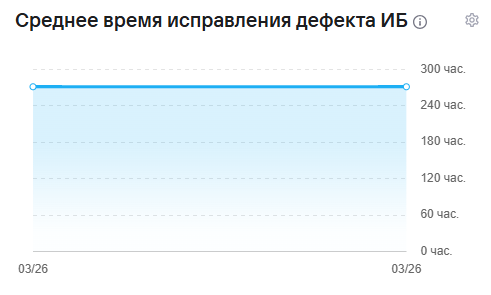
Mean Time to Resolve
This widget shows the average time spent remediating security issues.
Risk Density
This widget shows the concentration of security issues relative to the size of the analyzed application or project.

Integrated Risk Index
This widget shows the project's overall risk level, taking into account the severity and number of detected vulnerabilities.

Scan Frequency
This widget shows the intensity of security checks and how often scans run in projects.

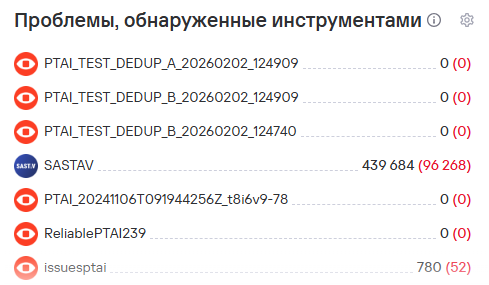
Issues by security tool
This widget shows the total number of vulnerabilities detected by the selected security tools.
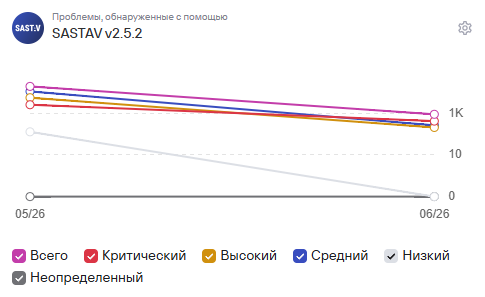
Issues for the selected tool
This widget shows the total number of vulnerabilities detected by one selected security tool.
Metric calculation formulas
Secure development practice coverage
The secure development practice coverage metric uses the following formula:
Coverage%
  = (Количество систем с применением практик
     / Общее количество систем) × 100
Risk Density (M)
The Risk Density metric uses the following formula:
M = (C_крит × W_крит
     + C_хай × W_хай
     + C_медиум × W_медиум
     + C_лоу × W_лоу
     + C_неопредел × W_неопредел)
    / C_все
where:
C_крит—the number of critical vulnerabilities in the project;C_хай—the number of high-severity vulnerabilities in the project;C_медиум—the number of medium-severity vulnerabilities in the project;C_лоу—the number of low-severity vulnerabilities in the project;C_неопредел—the number of vulnerabilities with an undefined severity level in the project;W_крит,W_хай,W_медиум,W_лоу,W_неопредел—the weighting coefficients for each severity level:W_крит = 1.0;W_хай = 0.8;W_медиум = 0.5;W_лоу = 0.2;W_неопредел = 0.3;
C_все—the total number of vulnerabilities in the project.
The system calculates C_все using the following formula:
C_все = C_крит + C_хай + C_медиум
        + C_лоу + C_неопредел
Integrated Risk Index
The Integrated Risk Index uses the following formula:
R = (H × V × L)^(1/3)
where:
H—Risk Density;V—Scan Frequency Ratio;L—the remediation time coefficient.
Coefficient V
The V coefficient (Scan Frequency) uses the following formula:
V = (F_проект - F_мин) / (F_макс - F_мин)
where:
F_проект—the scan frequency in the project.F_мин—the minimum scan frequency among all projects.F_макс—the maximum scan frequency among all projects.
The formula normalizes the project's scan frequency relative to the minimum and maximum values across all projects. The V coefficient ranges from 0 to 1:
- a value close to 0 indicates a low scan frequency;
- a value close to 1 indicates a high scan frequency.
Remediation and defect identification time coefficient L
This coefficient evaluates the speed of vulnerability remediation relative to the median value. It uses the following formula:
L = (MTTR_текущая + MTTD_текущая)
    / (MTTR_медианная + MTTD_медианная)
where:
MTTR_текущая—the current mean time to resolve a vulnerability (Mean Time To Resolve).MTTD_текущая—the current mean time to detect a vulnerability (Mean Time To Detect).MTTR_медианная—the median time to resolve vulnerabilities across all projects.MTTD_медианная—the median time to detect vulnerabilities across all projects.
The L coefficient reflects how defect processing time differs from the median values:
L < 1means that the project fixes and detects vulnerabilities faster than the median;L = 1corresponds to the median level;L > 1means that the project processes vulnerabilities more slowly than the median.
Other metrics
Fixed Vulnerabilities
This metric equals the ratio of closed vulnerabilities to the total number of vulnerabilities in the project.
Average time in a specific status
This metric equals the median time spent in each status, expressed as a whole number of hours.
Security Defect Lead Time (Lead Time)
Security Defect Lead Time equals the median defect lifetime, that is, the time from the New status to any closed status, for example, Fixed.
Mean Time to Detect (MTTD)
This metric equals the median time to identify defects in the project or projects. Defect identification means changing the status from New to any other subsequent status.
Mean Time to Resolve (MTTR)
This metric equals the median time from an open status other than New to a closed status.