Журнал событий
Раздел Журнал событий позволяет просматривать административные и функциональные события, которые совершают пользователи в системе, а также скачивать отчеты о событиях за выбранный период в формате CSV. Раздел содержит следующие вкладки:
- Администрирование — вкладка, в которой отображаются действия пользователей в системе (например, вход в систему, неудачная попытка входа, создание нового слоя и т.д.);
- Функциональные события — вкладка, в которой отображаются события, которые фиксируются системой автоматически в процессе выполнения операций — без прямого действия пользователя (например, результаты сканирование, срабатывание правил безопасности, синхронизации с инструментами безопасности и т.д.);
- Ошибки — вкладка, в которой отображаются ошибки, возникшие при выполнении операций (например, ошибки интеграции с инструментом безопасности, ошибки, связанные с проверкой доступа пользователей и т.д.).
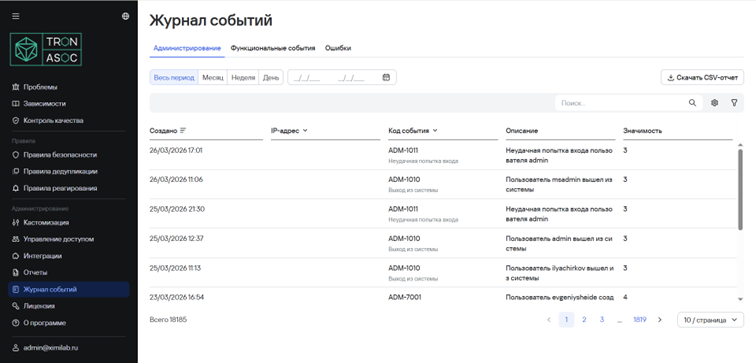
Скачивание отчета о событиях
Чтобы скачать отчет о событиях в системе, необходимо выполнить следующие шаги:
- Перейти в раздел Журнал событий
- Выбрать соответствующую вкладку:
- Администрирование - для административных событий
- Функциональные события - для действий пользователей
- Указать требуемый период времени
- Нажать на кнопку "Скачать отчет в формате CSV" После этого отчет будет автоматически загружен на компьютер в формате CSV.